 GCamator
GCamator
GCamator
GCamator intelligently matches your device to curated GCam ports, applies optimal configs, and makes installation painless — so your photos look professional with no fuss.

Everything you need to find, install, and configure the perfect GCam port for your device — in seconds.
Automatically detects your device model and recommends the most compatible, stable Google Camera ports optimized for your smartphone.
Access an extensive library of verified Google Camera ports from trusted developers, each tested for compatibility and performance.
Install the perfect Google Camera mod with a single tap. GCamator handles the technical details so you start taking better photos immediately.
Get optimal performance with pre-configured XML settings customized for your device. No hunting for the best settings needed.
Stay updated with the latest Google Camera ports. Get notified when better versions become available for your device.
Access helpful tutorials, troubleshooting guides, and a vibrant community of GCam enthusiasts to maximize your experience.
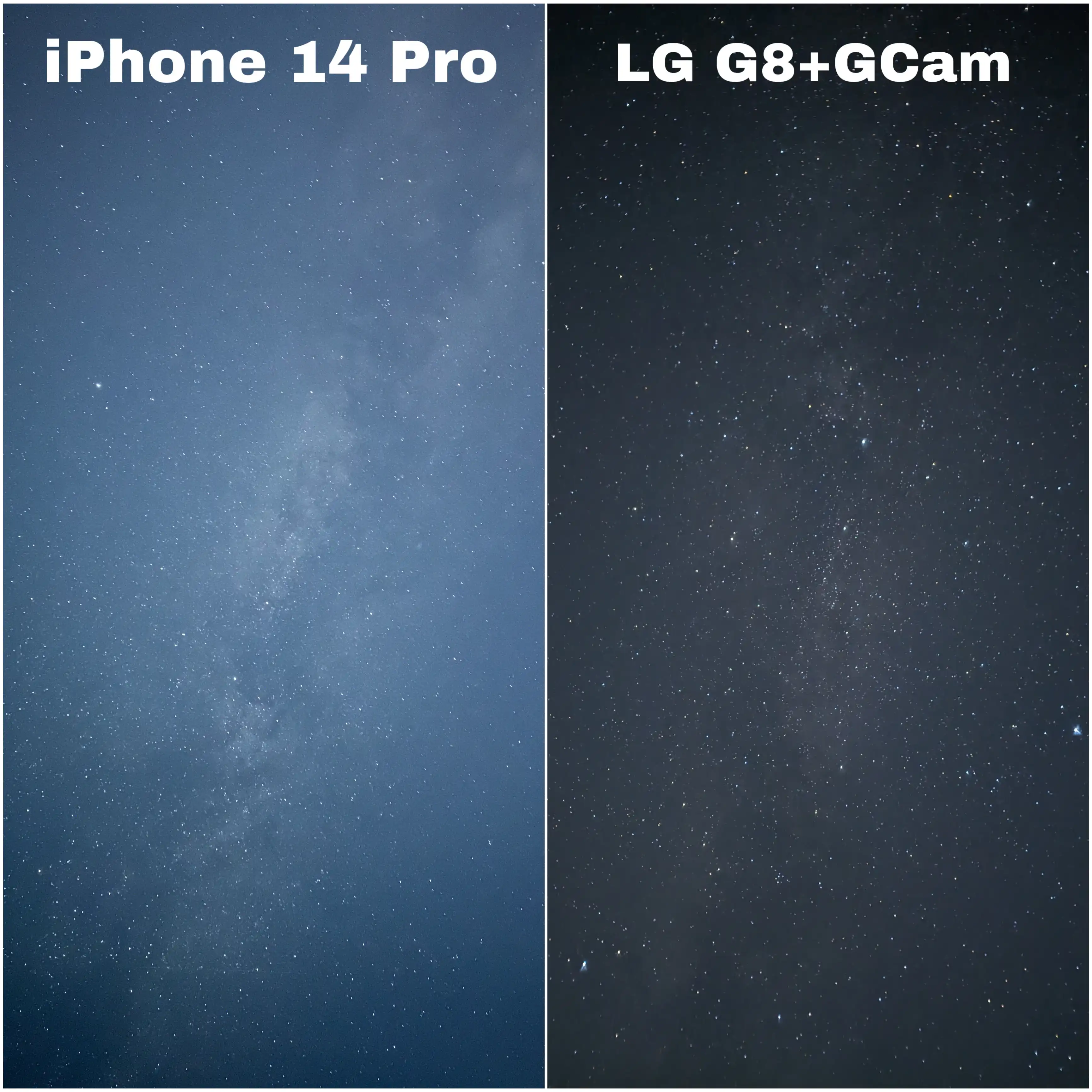
See the dramatic difference Google Camera makes compared to stock camera apps.
Left: iPhone 14 Pro | Right: LG G8 with Google Camera mod via GCamator — Notice improved detail, dynamic range, and natural colors.
| Feature | Stock Camera | Google Camera (via GCamator) |
|---|---|---|
| Low-light Performance | Limited visibility, high noise | Enhanced with Night Sight, reduced noise |
| Dynamic Range | Often blown highlights or dark shadows | Balanced exposure with HDR+ technology |
| Color Accuracy | Often oversaturated or unrealistic | Natural, true-to-life colors |
| Detail Preservation | Details lost in processing | Enhanced detail retention |
| Portrait Mode | Basic edge detection | Advanced algorithm for natural bokeh |
Watch these quick YouTube Shorts to see how easy it is to install GCam on various devices.
GCamator finds compatible Google Camera ports for a wide range of Android smartphones.
Don't see your device? GCamator constantly updates its database! Contact us to check compatibility.
Ready to discover the perfect Google Camera mod? Install GCamator and transform your phone's camera in minutes.
Install GCamator from the Play Store. It automatically identifies your device model and hardware.
Browse recommended GCam ports specifically optimized for your device with one-tap install.
Apply recommended configs and start taking stunning photos with Google Camera technology.
Android 9.0+
Camera2 API support
2GB+ RAM
50MB free storage
See why 250,000+ users trust GCamator for finding their perfect Google Camera port.
"GCamator made finding a GCam mod for my OnePlus 10T super easy! It recommended the perfect version and even applied optimal settings. Night shots are seriously impressive compared to stock cam!"
"Struggled for weeks trying to find a working GCam for my Xiaomi Redmi Note 11. GCamator found the perfect port in seconds! Colors are way more natural and portrait mode is amazing."
"Found the perfect GCam port for my Realme GT Neo 3 after trying several that didn't work. Device detection is spot-on and the low light performance with Night Sight is incredible!"
Discover our other useful applications and developer tools.
Lookup IP addresses, check BIN numbers, and perform domain WHOIS lookups — all in a single free Android app.
Powerful API for parsing GSM Arena data. Get comprehensive mobile device specifications easily.
Car fault code lookup with AI assistance: diagnostics, causes, and fix recommendations. API available on RapidAPI.
Instant Swagger/OpenAPI visualization. Paste your JSON and view it in an interactive UI.
Test your geography knowledge with our AI-powered Flags game. Identify flags from around the world and challenge your friends to beat your score.
Play Now — It's FreeDTCPool is an automotive intelligence platform that helps drivers, mechanics, and workshops quickly understand vehicle fault codes and service data. It combines a structured database of diagnostic trouble codes with AI-powered guidance to explain what a code means, what may have caused it, and how it can be fixed. The platform also provides vehicle-specific technical information such as car brands, models, types, oil specifications, and coolant specifications, making it easier to find the right data for the right vehicle.
Built for speed and clarity, DTCPool turns complex diagnostic information into practical, easy-to-use answers. Whether you are investigating a warning light, looking up a BMW-specific fault code, or checking the correct fluid spec for a car, DTCPool brings everything together in one place.
Have questions about compatibility, features, or need assistance? We're here to help.
Join our community for the latest updates, tips, and GCam port announcements.
Follow on Facebook Join Telegram Channel